Ollama 在 AutoDL 上的安装与远程访问
记录 Ollama 的环境变量、端口配置、模型管理和 Open WebUI 连接方法。
在autodl安装软件启动
OLLAMA_HOST       The host:port to bind to (default "127.0.0.1:11434")
OLLAMA_ORIGINS    A comma separated list of allowed origins.
OLLAMA_MODELS     The path to the models directory (default is "~/.ollama/models")
第一个窗口使用以下命令
export OLLAMA_HOST="0.0.0.0:6006"  #修改访问模型端口
export OLLAMA_MODELS=/root/autodl-tmp/models #修改模型储存位置
export OLLAMA_MODELS=/root/autodl-tmp/deepseek
export OLLAMA_MODELS=/root/autodl-tmp/qwen

source /etc/network_turbo //autodl学术资源加速
curl -fsSL https://ollama.com/install.sh | sh

#效果如下
>>> Cleaning up old version at /usr/local/lib/ollama
>>> Installing ollama to /usr/local
>>> Downloading Linux amd64 bundle
################################################################################################# 100.0%
>>> Adding ollama user to video group...
>>> Adding current user to ollama group...
>>> Creating ollama systemd service...
WARNING: systemd is not running
WARNING: Unable to detect NVIDIA/AMD GPU. Install lspci or lshw to automatically detect and install GPU dependencies.
>>> The Ollama API is now available at 127.0.0.1:11434.
>>> Install complete. Run "ollama" from the command line.

#更新本地软件包列表
sudo apt-get update

#解决 WARNING: Unable to detect NVIDIA/AMD GPU. Install lspci or lshw to automatically detect and install GPU dependencies.
sudo apt-get install lshw
#解决 WARNING: systemd is not running
apt-get install systemd -y
apt-get install systemctl -y

ollama serve #启动服务

 # 检查状态
systemctl status ollama.service

systemctl status ollama.service
然后在建立一个新的窗口
export OLLAMA_HOST="0.0.0.0:6006"
ollama run model_name
在启动端口转发在本地运行
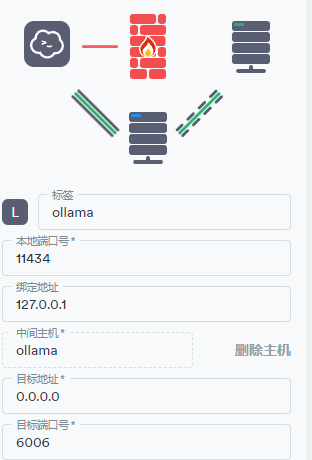
可以另开一个窗口看GPU占用情况
nvidia-smiollama 入门
环境设置
- OLLAMA_HOST:设置网络监听端口。当我们设置
OLLAMA_HOST为0.0.0.0时,就相当于开放端口,可以让人意外部网络访问。 - OLLAMA_MODELS:设置模型的存储路径。当我们设置
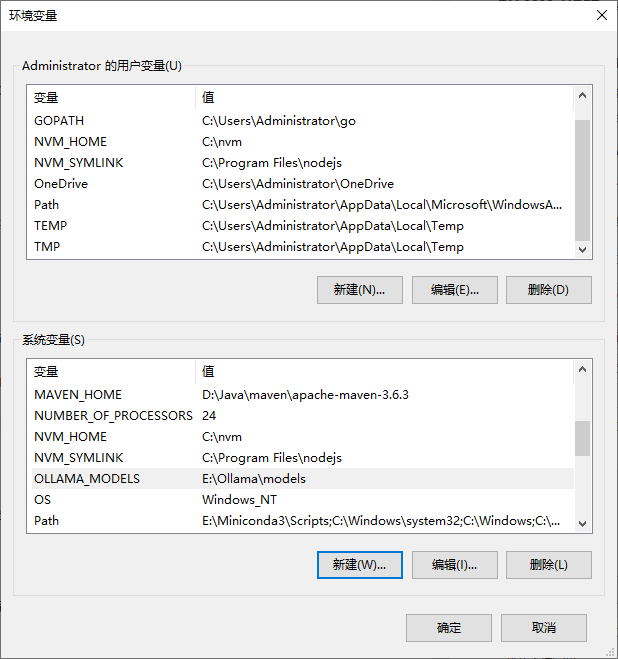
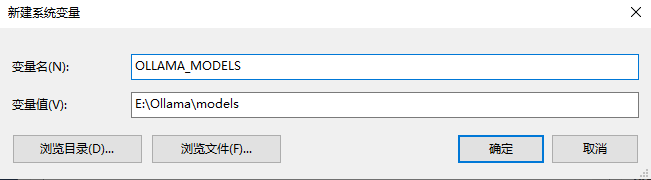
OLLAMA_MODELS=E:\Ollama\models,就相当于给模型们在E盘建了一个仓库,让它们远离C盘。 - OLLAMA_KEEP_ALIVE: 它决定了我们的模型们可以在内存里的存活时间。设置
OLLAMA_KEEP_ALIVE=24h,就好比给模型们装上了一块超大容量电池,让它们可以连续工作24小时,时刻待命。 - OLLAMA_PORT:用来修改ollama的默认端口,默认是
11434,可以在这里改为你想要的端口。 - OLLAMA_NUM_PARALLEL:限制了Ollama可以同时加载的模型数量。
- OLLAMA_MAX_LOADED_MODELS:可以确保系统资源得到合理分配。
windows使用:进入高级系统设置,点击环境变量,进入环境变量设置界面。
快速入门
使用以下命令下载并运行 Qwen 2.5 模型:
ollama run qwen2.5:7b使用以下命令列出当前正在运行的模型:
ollama ps要查看本地已下载的模型列表,可以使用以下命令:
ollama listAutodl使用Open-webui
source /etc/network_turbo
conda create -n openweb python=3.11

pip install open-webui -i https://pypi.tuna.tsinghua.edu.cn/simple

export OLLAMA_BASE_URL=http://your-ollama-server:11434

open-wenui serve

// openwebui默认11434端口
export OLLAMA_HOST="0.0.0.0:11434"